
Automation

All plans

SmartGL, AI-assisted accounting that you review before posting.

Categorize bank and credit-card activity against your chart of accounts, draft journal entries, and extract transactions from PDF statements, with every suggestion shown for review before it touches your ledger.

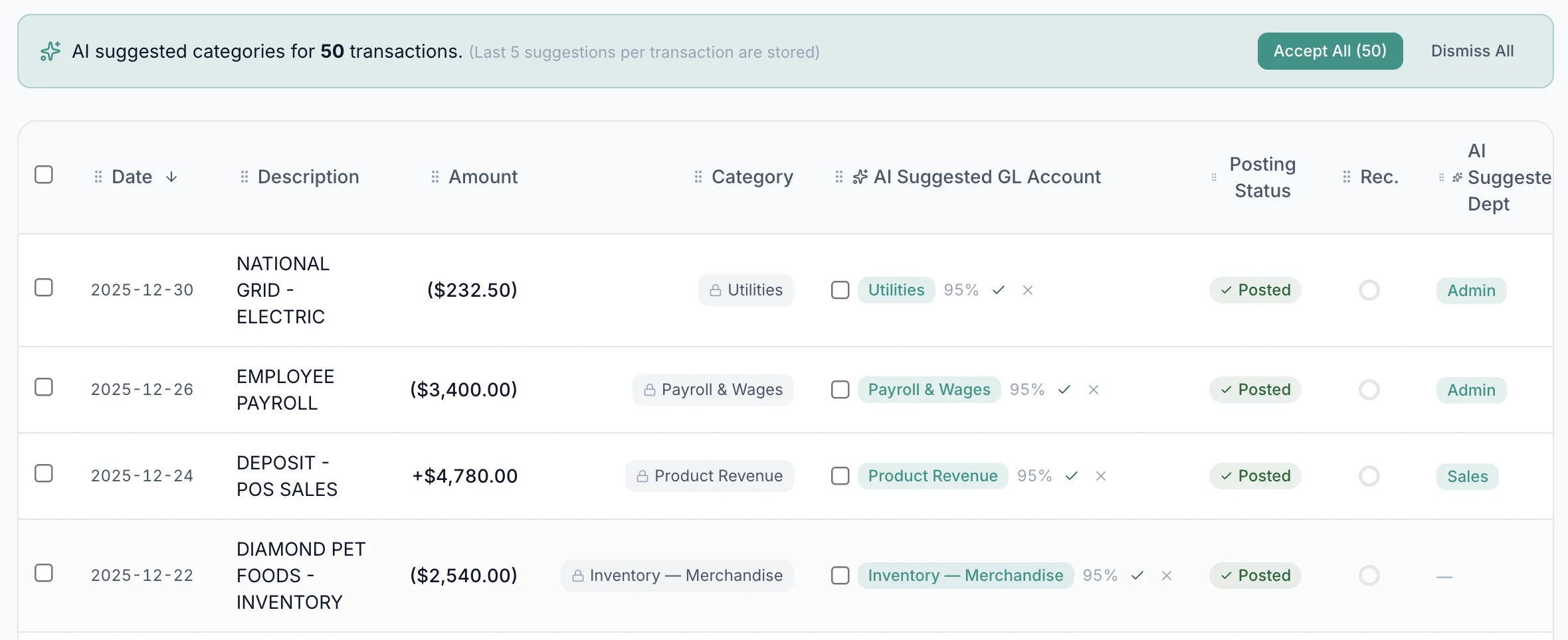
SmartGL categorizing bank transactions

How it works

01

Suggested categorizations, with the reasoning shown.

Connect Plaid, import CSV/OFX/QFX statements, or upload a PDF and SmartGL extracts every transaction. Each row is mapped to a GL account using your chart of accounts, per-vendor rules, and historical patterns. The accountant sees every suggestion and accepts, adjusts, or overrides it before anything posts.

  • Per-vendor, per-merchant, and keyword rules that auto-apply on import.
  • Split a single bank transaction across multiple GL accounts.
  • Plaid live feeds for bank, credit card, and brokerage activity.
  • AI PDF bank statement import for statements without a feed.

Where SmartGL plugs in

02

Every subledger feeds the same engine.

Bills, invoices, payroll runs, fixed-asset depreciation, prepaid amortization, FX revaluation, recurring journal entries, and crypto wallet activity all route through SmartGL. The double-entry posting logic is shared, so the trial balance never drifts based on which subledger originated an entry.

  • AP bills with line-item GL coding and approval-driven posting.
  • AR invoices with revenue recognition (ASC 606) and deferred revenue.
  • Payroll auto-posting from Gusto (DR Wages / CR Liabilities + Cash).
  • Depreciation and amortization schedules with monthly auto-posted JEs.
  • Crypto wallet scans (ASC 350-60) with fair-value mark-to-market.

Review before posting

03

Categorizing does not auto-post.

Categorizing a bank or credit-card transaction stages it for posting; you explicitly post to the GL. Dual-Control Mode adds a second-person approval step on top of that for every GL-touching action. Preparer and poster cannot be the same user.

  • Explicit post-to-GL action with a per-record audit trail.
  • Dual-Control Mode (drafter + approver) on every plan.
  • Configurable approval chains and separation-of-duties rules.
  • Per-record provenance (every entry shows who suggested it and who posted it.

AI Accountant

04

Ask questions in plain English. Get answers grounded in your books.

AI Accountant answers questions about your posted GL, drafts journal entries, bills, invoices, and intercompany entries, and proposes setup changes (chart of accounts, default accounts, approval workflows, vendors, customers, fixed assets, loans, inventory). A human with the right permission reviews and approves before anything takes effect, with full audit attribution.

  • Available on every plan. Plan-tier AI request and dollar caps apply.
  • Essentials includes 1 close-analysis review per month.
  • Growth and Enterprise include unlimited close analysis within plan AI caps.
  • AI footnote drafting from posted GL data (Growth and Enterprise).

Want a closer look?

See smartgl automation in a guided demo.

Walk through the workflow with our team. We'll show how it fits your books and answer questions on plan fit, migration, and rollout.

Questions

About smartgl automation.

Does SmartGL post journal entries automatically?

No. Categorizing a bank or credit-card transaction stages it; a person explicitly posts it to the GL. Subledger events (bills, invoices, payroll, depreciation, FX revaluation) follow the workflow you configure. For example, a bill only posts when it reaches the approved-and-paid status you set.

Can I see why SmartGL suggested a particular GL account?

Yes. Every suggestion is shown alongside the rules and history that drove it, and you can accept, edit, or override the suggested account, amount, or split before posting.

Is SmartGL available on every plan?

Yes. AI categorization, AI chat, AI PDF bank import, and the AI Accountant assistant are available on every plan. Each tier has monthly AI request and dollar caps; AI footnote drafting unlocks on Growth and above.

Can I bring my own Anthropic API key?

Yes. BYOK bypasses Quoining-side AI request and spend caps for your workspace but does not change plan-level feature gating.

Ready to put smartgl automation to work?

Start a free account in minutes, see the plan that fits, or book a guided demo with our team.